How to find every soldier from your village in a couple of hours, not a week
Here’s how this used to go. You go to Pamyat Naroda, the Russian Ministry of Defense’s online database of WWII soldiers, type in the name of your village, and get hundreds of records. You open each one, check it, copy the details out and paste them into a spreadsheet. You cross-check places of birth and places of enlistment. For a single village, that’s a week of work.
With AI, it takes a couple of hours. That’s how I collected the data for my own village, Lyuga-Kaksi. If your ancestors lived anywhere in the former Soviet Union, the same recipe works for their village.

What you’ll need
- Claude in Chrome, which requires a Claude subscription
- This prompt. It’s written in Russian for my village, so ask the AI to translate it if you want to read or adapt it
How to do it (the easy way)
- In Google Chrome with the Claude in Chrome extension, open a chat with the AI
- Paste the prompt and replace my village, district and region, along with their spelling variants, with your own
- Go have some tea
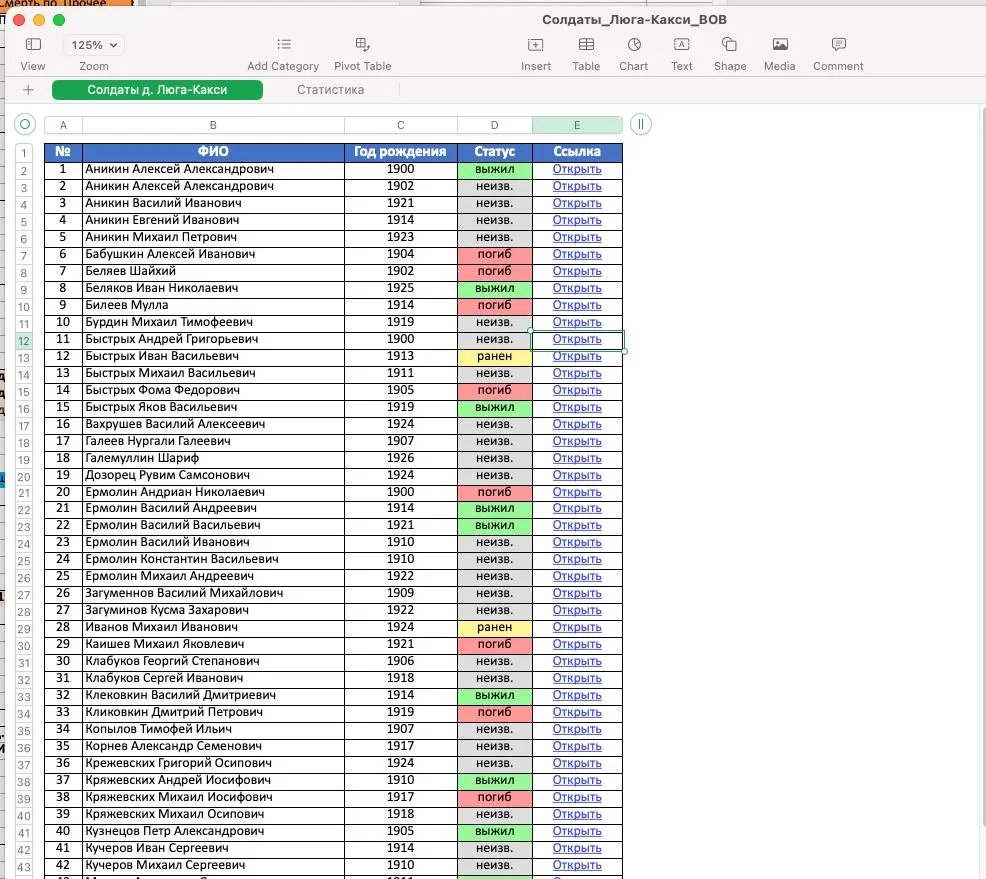
- Get a spreadsheet with full names, years of birth, status and links to the record cards
How to do it (for the tech-savvy)
- Turn on browser access for Claude Code
- Launch Claude Code
- Paste the prompt
- An hour later, get a spreadsheet with all the data
Tools
- warsearch.ru: a handy search over Pamyat Naroda by surname or place of birth (in Russian)
- gwar.mil.ru: the Russian Ministry of Defense’s database of World War I soldiers (in Russian)
- Claude in Chrome: automates the data collection
Try it on your village and show me what you get!